

Sign in and choose an account
Understand which identity and account your connection uses.
Sign-in establishes who you are. Account selection chooses where you work. The service still checks your permissions for each operation.
Choose an account
- Start sign-in from your client's MCP settings or login command.
- Complete Magnite sign-in in the browser.
- In Select your account, choose the platform and account assigned to your work.
- Return to the client and run its read-only verification.
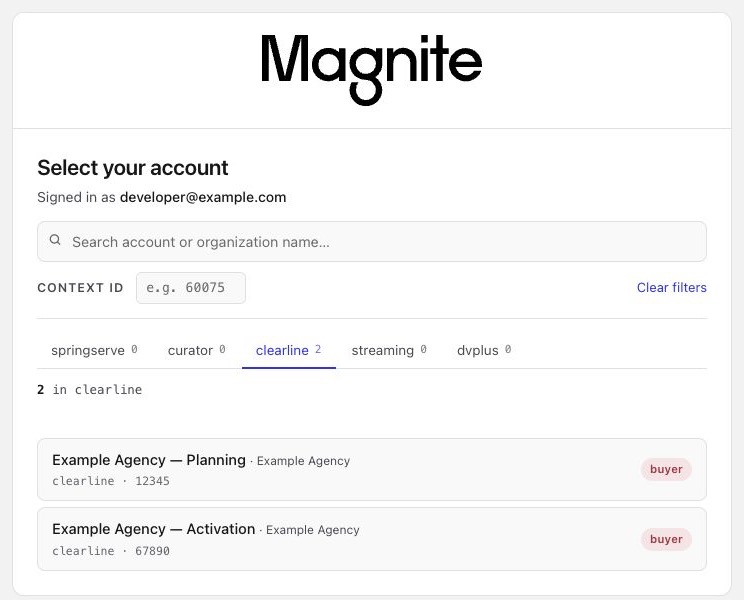
The gateway's account picker with sample accounts. For Orchestration, select a ClearLine account labeled buyer. Names and IDs will differ for your identity.
If the account is missing, clear the filters and search by account or organization name. Still missing?
Switch accounts
Disconnect or clear the saved authorization for this MCP connection, then authorize it again. Choose the new account and repeat the verification read.
Logging out of the browser alone may leave your client using saved credentials. An explicit account header also overrides the picker; update it if you configured one.
For a connection named orchestration:
codex mcp logout orchestration
codex mcp login orchestration --scopes openid,profile,email,offline_access,mcp:context-picker
Replace orchestration with your existing connection name. Open a new Codex session after sign-in.
The gateway advertises offline_access. When your client and the authorization server support renewal, the client can refresh access without opening the picker again. The selected account must be preserved during renewal.
If a connection loses account context after renewal, clear that connection's saved authorization and sign in again. Older connections can retain refresh credentials that predate account-preserving renewal. Do not assume every token has the same lifetime.
Applications can send x-auth-context alongside a valid bearer token. Its format is platform/context-type/account-id. For a ClearLine buyer, the machine value is clearline/dsp_sub/ACCOUNT_ID; buyer is the picker label, not the header value.
Use the exact context assigned to your authenticated identity. The header takes precedence over the picker selection and does not grant account access. See Call from code.